
Pastmark keeps a log of what happens on your WordPress site. You can see who logged in, who changed a post, who activated a plugin, and much more. Pastmark is free. There is also a paid add-on, Pastmark Pro.
Before you start #
- You need WordPress 6.2 or newer.
- You need PHP 7.4 or newer.
- You must be an administrator.
Install and activate Pastmark #
- In your dashboard, go to
Plugins → Add New Plugin. - In the search box, type Pastmark.
- Find Pastmark – Activity Log, User Activity & Audit Trail. Click Install Now.
- Click Activate.
- Pastmark opens the Activity Logs page for you.
What you see after activation #
A new menu called User Activity appears on the left. It has four pages:
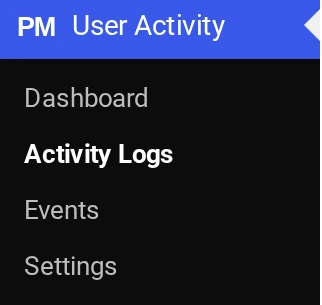
| Page | What it does |
|---|---|
| Dashboard | Charts and numbers about your site activity. |
| Activity Logs | The list of everything Pastmark recorded. |
| Events | Choose what Pastmark records. |
| Settings | Email reports, exclusions, privacy and more. |
You also see this message at the top of the Pastmark pages:
Pastmark is now logging activity using the Recommended preset.The first entry in your log is Pastmark plugin activated.
What Pastmark does by default #
- It records activity with the Recommended preset. Read Choose what Pastmark records.
- It deletes log entries that are older than 3 months.
- It shows a Latest Activity Logs box on your WordPress dashboard.
Pastmark also sends a weekly email report every Friday at 9:00 PM to your site’s admin email. You can change or turn off this email in User Activity → Settings → Email Reports. Read Email reports.
Who can see the log #
Only administrators can open the Pastmark pages.